
How to import or export Webmail contact
Your list of email contacts (your address book) can be imported from an existing address book in another mail programme to Webmail, or exported from your Webmail account to a different mail programme.
- Log in to your Webmail account
- Click on Contacts at the top right
- Select your option to Import or Export

- Import
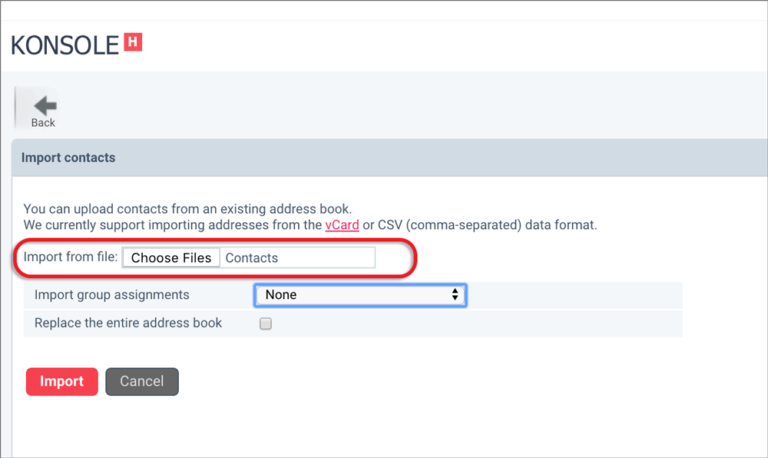
- Imported contacts should be in the vCard or CSV (comma-separated) data format
- Click Choose Files, then Import
- Export
- Click on Export to download all contacts
- Alternatively, click on the dropdown arrow to choose Export all or Export selected
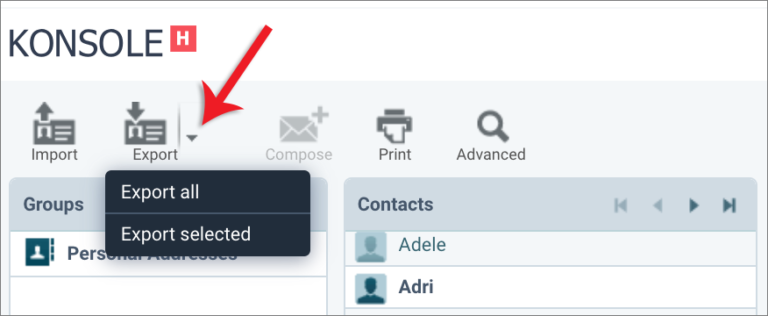
- To download selected contacts, click on one or more items from your contact list (use ctrl/cmd or shift to select multiple), then click Export selected
- Exported addresses will be in the vCard format via a downloaded file
Posted in Webmail